PM2: The Lean Alternative to Kubernetes for Scalable Production Apps
Professional production control without orchestration overhead

Iago Mussel
CEO & Founder
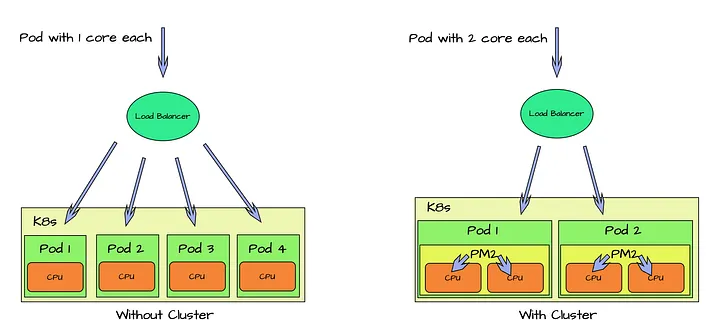
Kubernetes, clusters, data pipelines, serverless. Powerful? Yes. Necessary for every project? No. When the problem is simple, complexity becomes waste. Cost increases. Latency increases. Operational burden increases. If you need a professional, production-grade solution that is simple to implement and scale, PM2 delivers. PM2 (Process Manager 2) is an open-source production process manager built specifically for Node.js environments. It focuses on performance, scalability, and operational reliability, without infrastructure overhead.
The uncomfortable truth is that most teams don’t adopt Kubernetes because their traffic demands it. They adopt it because it signals seriousness, and then they spend engineering months feeding the machine: manifests, ingress controllers, cluster upgrades, a platform nobody asked for. Meanwhile the actual product is three Node services that would run happily on one box.
Here is why it still matters.
1. Advanced Monitoring Without External Stack
PM2 includes built-in monitoring and real-time metrics:
- CPU usage
- Memory consumption
- Event loop latency
- Restart count
- Log aggregation
You detect bottlenecks early. You fix issues before users notice. No Prometheus + Grafana stack required to start.
The one on that list people sleep on is event loop latency. A Node app can show comfortable CPU numbers while a blocked event loop makes every request crawl, and standard server metrics won’t tell you that. Having it visible out of the box, with pm2 monit running live in a terminal, catches a whole class of Node-specific problems before you’ve wired up any observability tooling.
To be fair about the limits: PM2’s built-in view is live and per-machine. It won’t give you six months of history and it won’t page anyone at night. When you genuinely need dashboards, retention, and alerting, add those tools then. The point is you don’t need them on day one, and plenty of projects never reach the day they do.
2. Horizontal Scaling in Seconds
Cluster mode turns one Node.js process into multiple workers using all CPU cores.
pm2 start app.js -i maxThat is it.
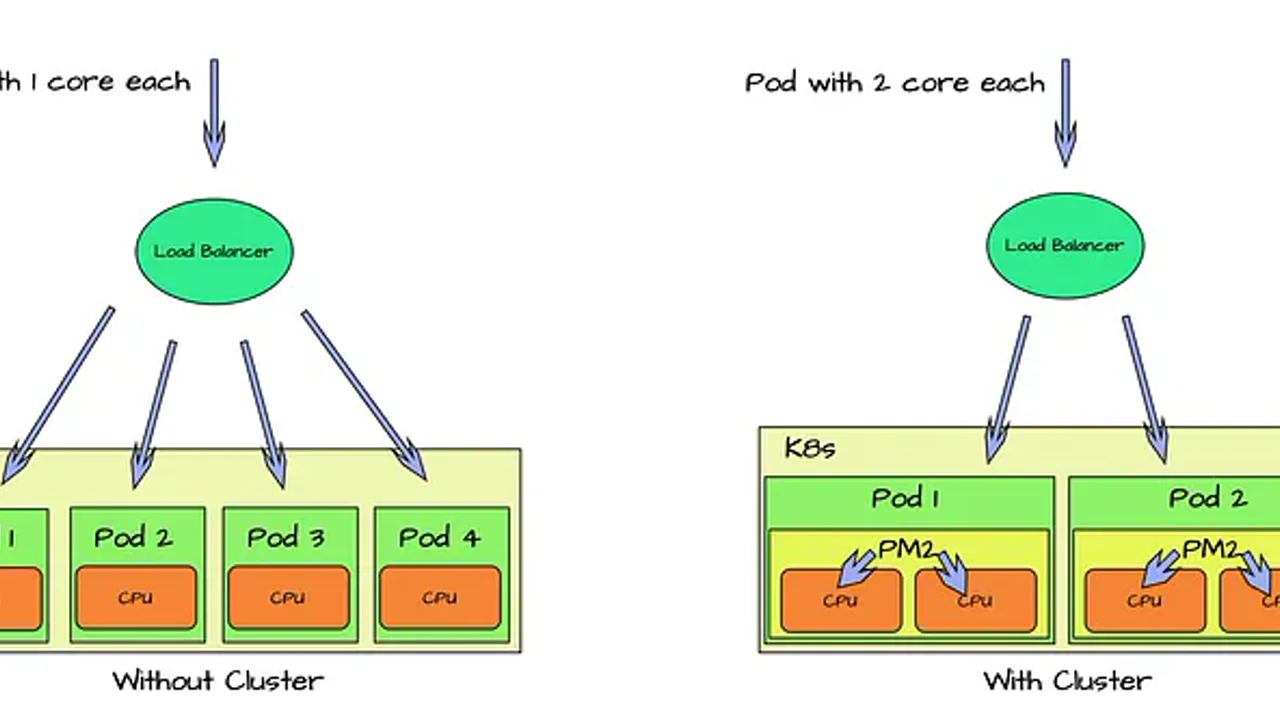
PM2 handles:
- Built-in load balancing
- Multi-process distribution
- Zero-downtime reloads
Traffic spike? Add instances. Need more capacity? Scale vertically or replicate behind a simple load balancer. For many workloads, this replaces Kubernetes entirely.
One honest caveat: cluster mode assumes your app is stateless. Each worker is a separate process with its own memory, so in-memory sessions, local caches, and websocket state stop being shared the moment you go from one instance to eight. The fix is standard, move shared state to Redis or your database, and it’s the same discipline Kubernetes would have forced on you anyway. Better to pay that cost with a one-line scaling command than in the middle of a cluster migration.
Also think twice about -i max on a shared box. If the same server runs your database, leave it some cores. pm2 start app.js -i 4 scales exactly as easily.
3. Operational Simplicity
Production management becomes predictable:
- start
- stop
- restart
- reload
- logs
- status
Deploy updates without downtime:
pm2 reload appNo rolling deployments across pods. No complex orchestration layers. Just controlled process management.
The reload command deserves a closer look, because it does more than restart. pm2 reload spins up fresh workers, waits for them to be ready, then retires the old ones, so requests in flight finish on the old code while new traffic lands on the new code. Your part of the bargain is graceful shutdown: handle the termination signal, stop accepting connections, finish what’s running, close your database pool. If your app dies abruptly on shutdown today, fix that before trusting any zero-downtime story, PM2 or Kubernetes alike.
Two habits turn PM2 from a convenience into an actual production setup. First, describe your services in an ecosystem.config.js checked into the repo, with instance counts and environment per app, so deploys stop depending on whatever flags someone remembered to type. Second, run pm2 startup once and pm2 save after changes, so the whole process list comes back after a server reboot. That second one is the step everyone discovers missing at the worst possible time.
4. Automatic Recovery
Production fails. The difference is how fast you recover.
PM2 automatically:
- Restarts crashed processes
- Handles memory limit reloads
- Maintains uptime
High availability without external supervisors.
The memory-limit reload is the honest one to talk about. Set max_memory_restart and a leaking process gets recycled before it takes the box down, which keeps you asleep at 3am. It’s a mitigation, not a cure: the leak is still there, and PM2’s restart counter is now your leak detector. A service quietly restarting forty times a day is telling you exactly where to dig.
The real boundary is the machine itself. PM2 recovers processes on one server; if the server dies, PM2 dies with it. That’s the strongest genuine argument for Kubernetes, and the lean answer is smaller than a cluster: two modest VMs behind a load balancer, each running PM2, covers most of that risk for a tiny fraction of the operational surface.
5. It Plays Nicely With What You Already Run
PM2 integrates with:
- Log systems
- Monitoring tools
- Docker
- Reverse proxies
- CI/CD pipelines
It fits into existing infrastructure without forcing architectural rewrites.
In practice that means PM2 behind nginx or Caddy for TLS and routing, the log-rotation module so disks don’t silently fill up, and a CI pipeline that ends in pm2 reload over SSH instead of a Helm chart. Already containerized? PM2 runs fine as the process manager inside the image. Nothing about choosing it locks you out of graduating later.
When PM2 Beats Kubernetes
Use PM2 when:
- You run 1-10 services
- You control a VM or dedicated server
- Traffic is predictable or moderate
- You value simplicity and cost efficiency
- You want production reliability without orchestration overhead
Flip that list and you get Kubernetes territory: dozens of services owned by multiple teams, spiky traffic that needs machines added and removed automatically, workloads that must survive a host dying without a human involved, or an organization that already employs platform engineers to run the thing. In that world, Kubernetes earns its complexity. The mistake isn’t using it. The mistake is defaulting to it before any of those conditions exist.
Kubernetes solves distributed systems problems. PM2 solves production process problems. Different scopes. Different costs.
Strategic View
Not every system needs clusters. Not every service needs serverless. Most startups and internal tools fail from operational overengineering, not lack of orchestration.
The migration path exists in both directions, but only one of them is cheap. Going from PM2 on a VM to Kubernetes when you genuinely outgrow it is a planned project. Unwinding a premature cluster while it’s serving production traffic is surgery.
Start simple. Scale when complexity justifies it. PM2 gives you professional-grade production control with minimal operational surface area.
Lean. Scalable. Reliable. Now deploy.
I work with teams building production systems and developer tooling. If this topic resonates, you can find more of my work at https://huntermussel.com.
Share
 LinkedIn
 Twitter
 Facebook
 WhatsApp
 Telegram
 Reddit
Related articles
How to build a CI/CD pipeline from scratch with GitHub Actions, Docker, and Kubernetes
A practical, step-by-step guide to building a production-grade CI/CD pipeline using GitHub Actions, Docker, and Kubernetes — from zero to working deploy.
DevOps for AI teams: the infrastructure nobody teaches
AI teams don't fail because of bad models. They fail because the surrounding infrastructure — CI/CD, observability, cost controls, and data pipelines — wasn't built for non-deterministic workloads.
AI agents in production: why most prototypes never ship
AI agent prototypes impress in demos. Production is where they fall apart. Here's why — and the architecture, tooling, and governance that separate working prototypes from shipped agents.